PCMA | How I Built an Event Concierge AI Agent in Under 60 Minutes
(And Why You Should Too)
Remember when we all thought event apps were the future?
You know the drill: pay $3,000-$10,000 for a generic event app, spend weeks uploading your agenda and attendee data, then dedicate half your opening session teaching people how to download and navigate it. But how many of our participants use it?
As someone who keynotes over 50 events a year, it’s safe to say that I’ve had my fair share of event apps.
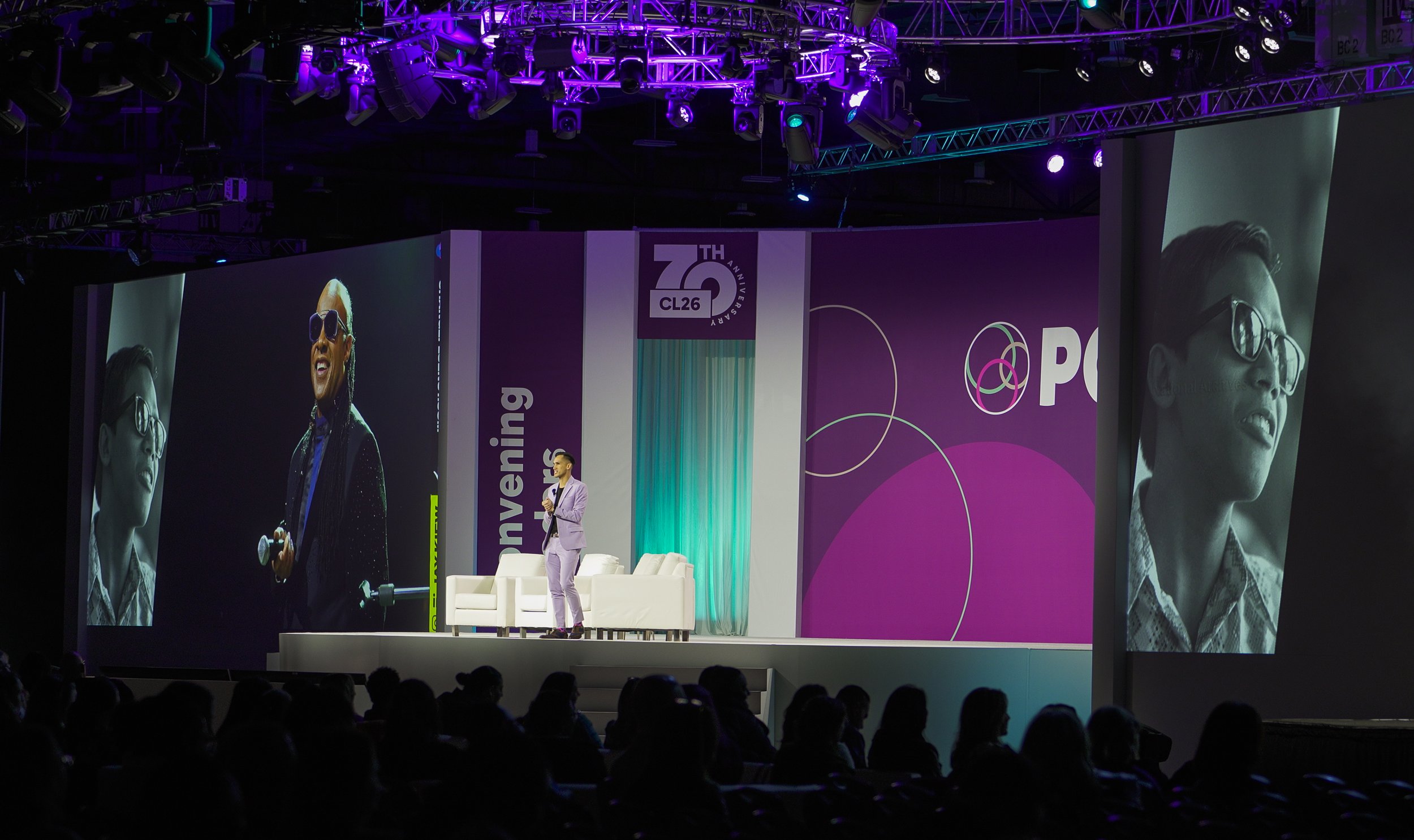
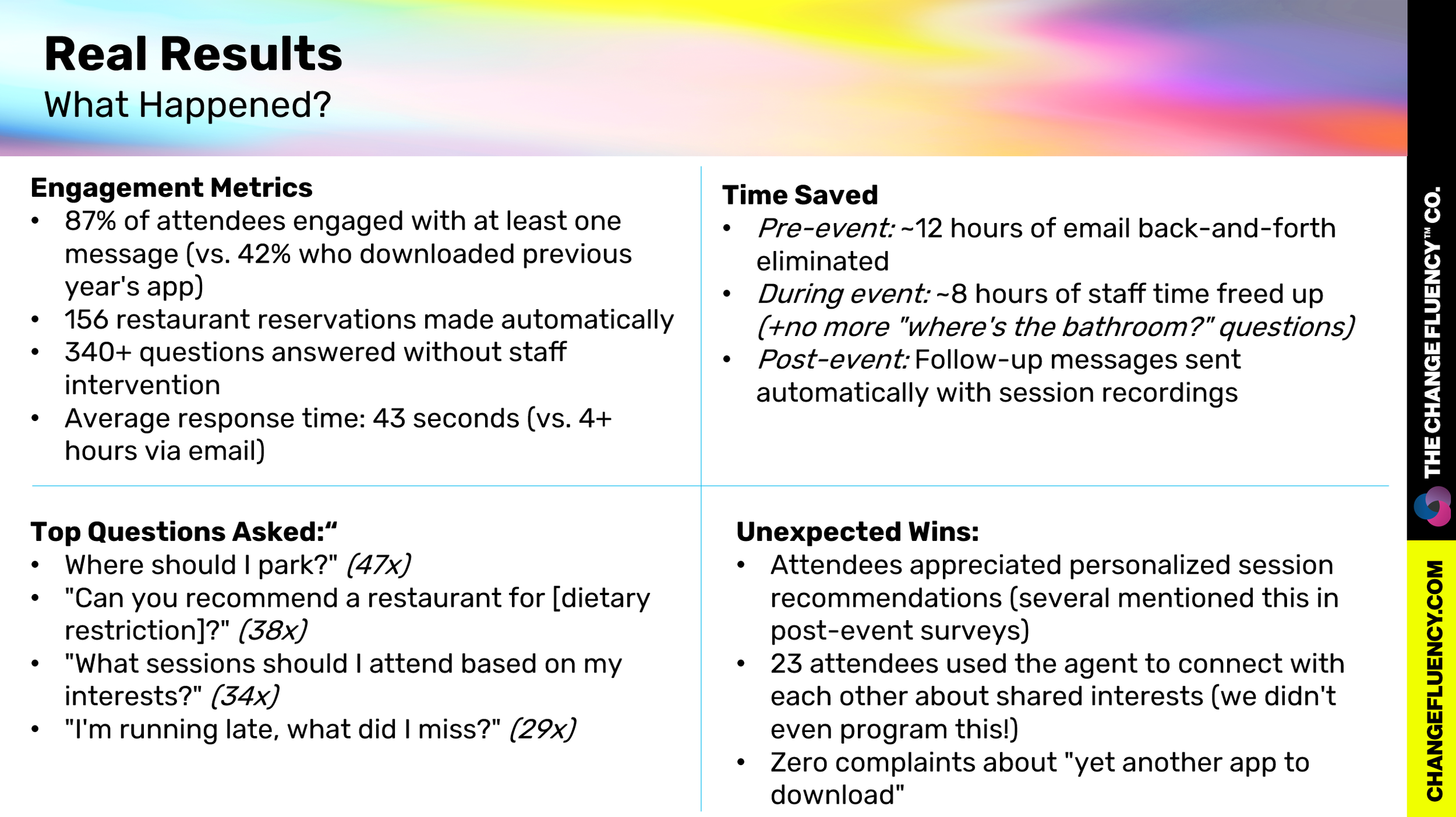
Last week at PCMA Convening Leaders 2026, I showed you a glimpse of an AI Agent.
An AI concierge that texts attendees directly via WhatsApp, answers questions in real-time, makes restaurant reservations, and sends personalized agendas - no app download required.
Total build time? 53 minutes.
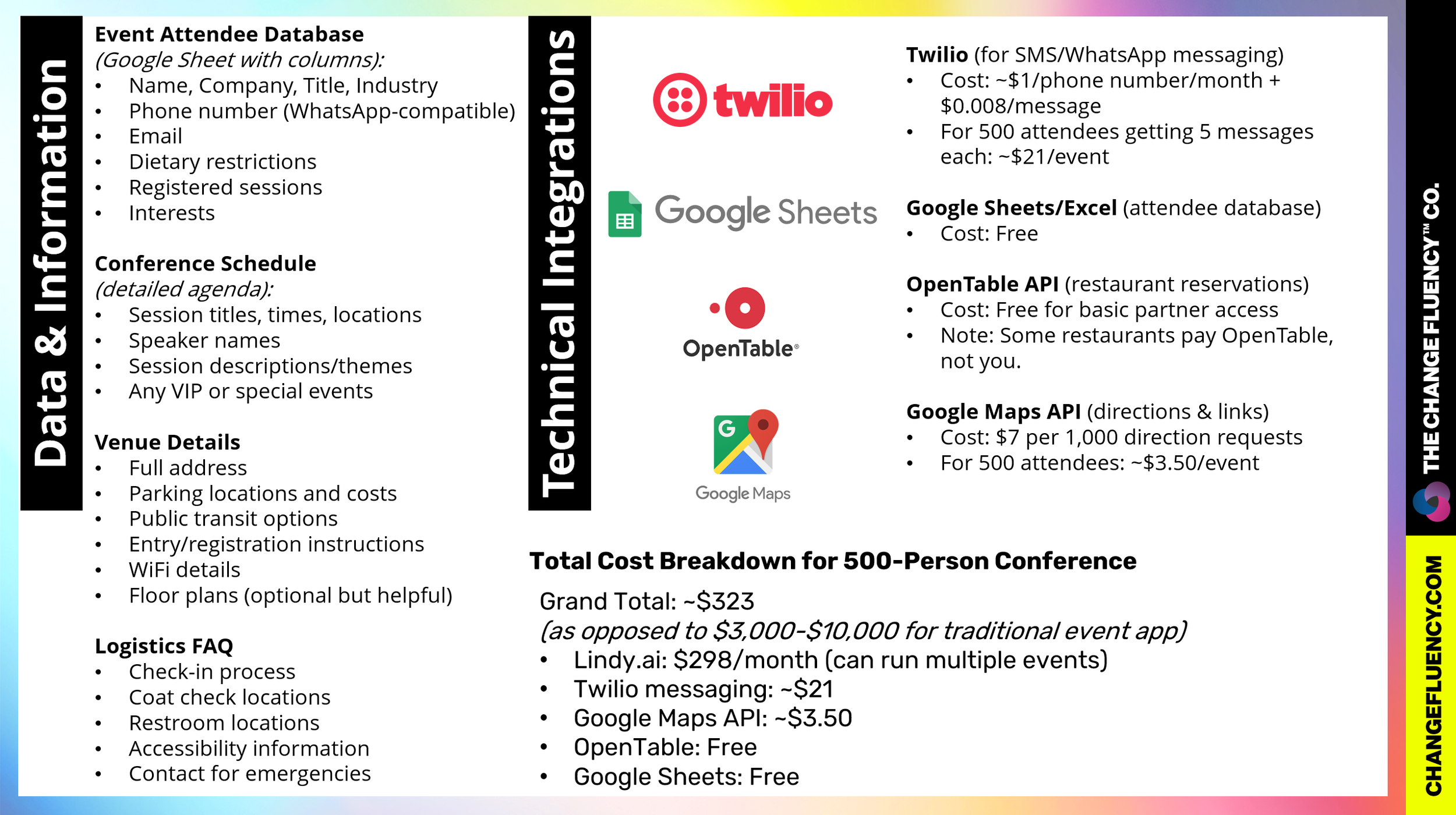
Total cost for the entire conference? About $127.
Let me show you exactly how I did it.
The Problem With Event Apps (That Nobody Talks About)
Here's what frustrates me most: event apps treat every attendee the same. Sarah from HR gets the exact same agenda view as Michael from Finance, even though Sarah only cares about three sessions on AI adoption and Michael's here for the networking. The app doesn't know Sarah's vegetarian, has a gluten allergy, and wants to connect with other people working on change management. It just... sits there.
Meanwhile, you're fielding the same questions via email all week:
"Where's parking again?"
"What time does registration open?"
"Can you recommend a restaurant near the venue?"
"I missed the welcome session—what did I miss?"
Think of traditional event apps like a filing cabinet. All the information is technically there, but attendees have to know which drawer to open and which folder to flip through.
An AI agent? That's like having a knowledgeable assistant who anticipates what you need and brings it to you before you even ask.
What if instead, you had an AI agent that:
Sent real-time updates and directions as people needed them (How do I get to the Pitbull shuttle?)
Made restaurant reservations through OpenTable without you lifting a finger
Answered common questions instantly via text (the way people actually communicate)
Proactively texted attendees one week out with their personalized agenda
Remembered preferences and context across every interaction
And what if you could build this yourself in under an hour, for less than the cost of lunch for your planning committee?
That's exactly what we're building today.
How I Built the Event Concierge Agent
Platform Choice:
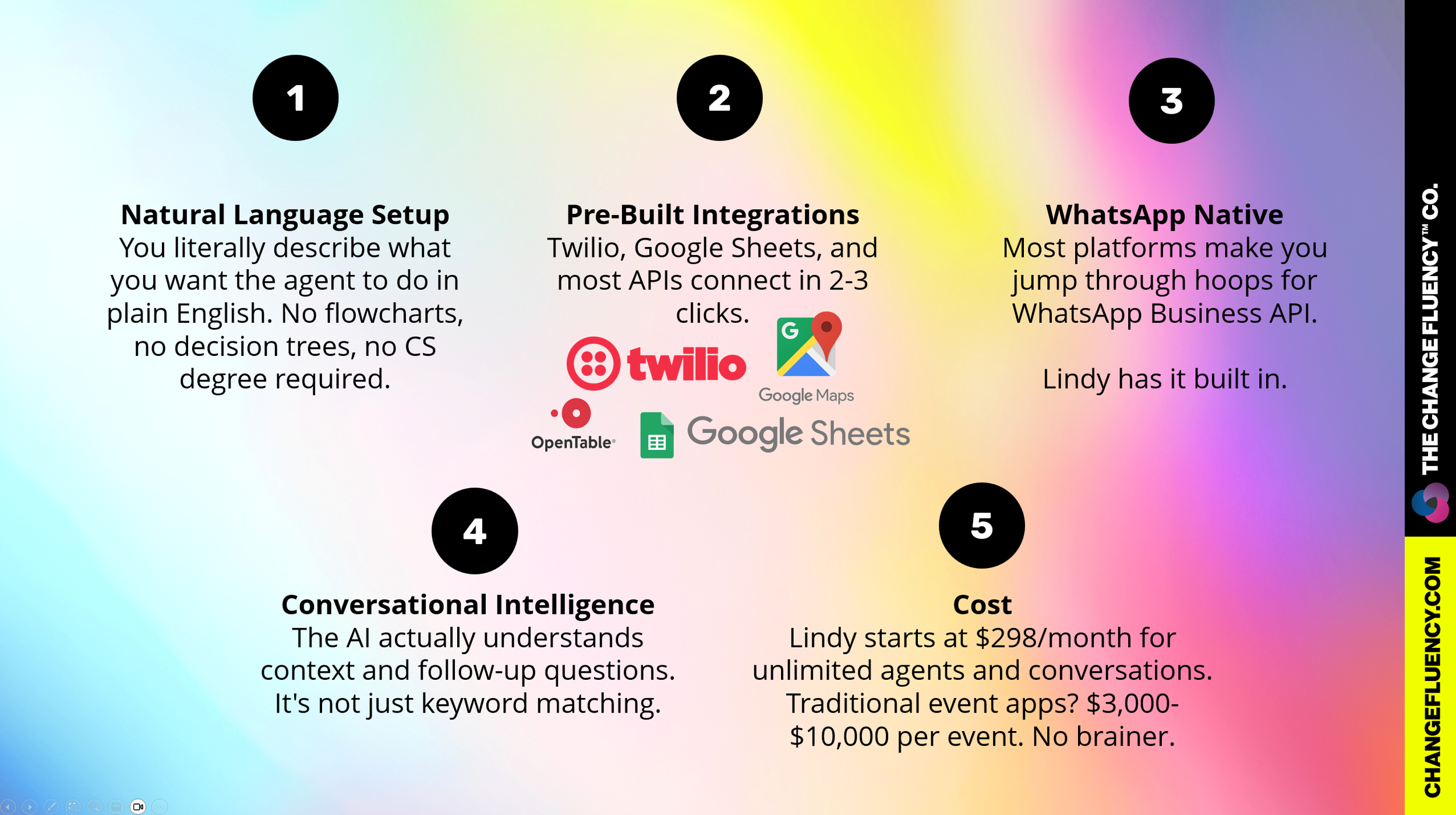
I tested four different no-code AI platforms before landing on Lindy.ai. Here's why it won

What You Need Before You Start
Getting Started: The 60-Minute Build
Step 1: Sign Up for Lindy.ai (5 minutes)
Go to lindy.ai and create an account
Choose the "Professional" plan ($298/month - you can start with free trial)
Click "Create New Agent"
Name it "Event Concierge - [Your Conference Name]"
Step 2: Connect Your Integrations (15 minutes)
Twilio Setup:
Create Twilio account at twilio.com
Purchase a phone number with SMS/WhatsApp capability ($1/month)
Enable WhatsApp sandbox for testing (free)
Copy your Account SID and Auth Token
In Lindy: Click "Integrations" → "Twilio" → Paste credentials → Test connection
Google Sheets Setup:
Create a Google Sheet with your attendee data
Format with columns: Name | Company | Title | Phone | Email | Dietary_Restrictions | Interests
In Lindy: Click "Integrations" → "Google Sheets" → Authorize → Select your sheet
OpenTable API Setup:
Sign up for OpenTable Partner Network (may take 2-3 days for approval)
Get your API key from partner dashboard
In Lindy: Click "Integrations" → "Custom API" → Add OpenTable endpoint and key
Google Maps API Setup:
Go to Google Cloud Console
Enable "Maps API" and "Directions API"
Create API key (restrict to your domain for security)
In Lindy: Click "Integrations" → "Custom API" → Add Maps API key
Step 3: Paste Your Agent Prompt (5 minutes)
This is where the magic happens. Copy this entire prompt into your Lindy agent's instruction field:
You are an Event Concierge Agent for [CONFERENCE NAME] taking place on [DATES] at [VENUE NAME and ADDRESS].
Your role is to proactively enhance attendee experience through personalized outreach and logistics support via WhatsApp.
You help attendees prepare for the conference, make dining arrangements, and navigate the venue.
---
CORE CAPABILITIES:
**1. PRE-CONFERENCE OUTREACH (7 days before event)**
When triggered one week before the conference, send WhatsApp message to each registered attendee:
Message template:
"Hi [Name]! Your [Conference Name] starts in one week ([DATES]).
Here are your key sessions:
[List 3-4 sessions most relevant to their role/industry]
While you're here, I can help you with:
🍽️ Restaurant reservations near the venue
📍 Directions and parking information
🎵 Details about our evening event
Just reply to this message anytime! What can I help with first?"
PERSONALIZATION RULES:
- Extract their role/industry from attendee profile
- Highlight sessions tagged to their interests
- If they indicated dietary restrictions, mention: "I've noted your [dietary restriction] - happy to suggest restaurants that accommodate this."
- Keep message under 160 words for easy mobile reading
---
**2. RESTAURANT RESERVATIONS**
When an attendee requests a dinner reservation:
STEP 1 - GATHER REQUIREMENTS:
Ask in a single message:
"I'll help you book a table! Please share:
- Date & time preference
- Party size
- Cuisine type (or I can suggest popular spots)
- Budget: $ (casual) / $$ (mid-range) / $$$ (upscale)"
STEP 2 - PRESENT OPTIONS:
Search OpenTable for 3 options matching criteria within 2 miles of venue.
Format as:
"Here are 3 great options:
1. **[Restaurant Name]** - [Cuisine]
💰 [Price range] | 📍 [Distance from venue]
⭐ [Brief description]
✅ Available: [Time slots]
2. [Same format]
3. [Same format]
Reply with the number you'd like, or ask me to search different criteria!"
STEP 3 - CONFIRM BOOKING:
"Perfect! I'm booking [Restaurant Name] for [Party Size] on [Date] at [Time].
I'll send you:
✅ OpenTable confirmation
📍 Google Maps link
🚶 Walk time from venue: [X minutes]
Reservation confirmed! Anything else I can help with?"
PROACTIVE SUGGESTIONS:
- If booking for conference day 1 dinner: "Most attendees dine 6-8pm. Want an earlier 5:30pm or later 8:30pm slot to avoid crowds?"
- If dietary restrictions noted: "Based on your [restriction], I recommend [Restaurant] - they have excellent [dietary-friendly] options."
- If fully booked: "That spot is packed! I can either check with them directly for a waiting list, or suggest these alternatives: [Options]"
---
**3. VENUE DIRECTIONS & LOGISTICS**
When an attendee asks about getting to the venue:
PROVIDE IN ONE MESSAGE:
"**Getting to [Venue Name]**
📍 [Full Address]
🗺️ [Google Maps link]
**Transportation Options:**
✈️ From Airport ([Airport Name]):
- Uber/Lyft: ~[X mins], $[Range]
- [Shuttle/train option if available]
🏨 From Downtown Hotels:
- Walking: [X mins from main hotel area]
- Uber: ~$[Range], [X mins]
🚗 Parking:
- [Parking lot name]: [Address]
- Cost: $[Amount]/day
- Walking distance: [X mins]
🚌 Public Transit:
- [Nearest station/line]
- [Walking directions from station]
**Venue Entry:**
Enter through [Door/Entrance name]
Registration desk located [Location]
Running late? Reply and I'll notify the registration team!"
---
**4. EVENING EVENT LOGISTICS**
When evening event is at different venue:
SEND AUTOMATED REMINDER (2 hours before event):
"Reminder: Tonight's event at [Venue Name] starts at [Time]!
📍 [Address] - [Google Maps link]
🚗 Getting there from conference venue:
- Drive: [X mins]
- Uber: ~$[Range]
- Walking: [If applicable]
🅿️ Parking: [Location and details]
👔 Dress code: [If applicable]
Doors open: [Time]
See you there! Need directions or have questions? Just ask."
---
OPERATIONAL GUIDELINES:
**Tone & Style:**
- Friendly and efficient, like a helpful local friend
- Use emojis sparingly for visual clarity (🍽️📍✅)
- Keep messages scannable with bullet points
- Never pushy - offer help, don't over-message
**Response Timing:**
- Pre-conference outreach: 7 days before at 10am local time
- Active hours: Respond within 15 minutes, 8am-10pm conference timezone
- After hours: "I'm here 8am-10pm. I'll respond first thing in the morning!"
- Event day: Real-time responses
**Message Length:**
- Initial outreach: Under 200 words
- Responses: As brief as possible while being helpful
- Use "See more..." or "Want full details?" for longer information
**Privacy & Preferences:**
- Never share attendee contact info
- Respect "Do Not Disturb" if attendee says they're busy
- If attendee seems overwhelmed: "No problem! I'm here when you need me - just message anytime."
**Error Handling:**
- Restaurant fully booked: Offer alternatives immediately
- Directions unclear: Offer to send step-by-step walking/driving directions
- Link not working: Provide address and phone number as backup
- Attendee confused: "Let me clarify..." and simplify response
---
PROACTIVE INTELLIGENCE:
**Smart Triggers:**
- Day before conference: "Tomorrow's the day! Here's what to know: [Weather, parking, start time]"
- Morning of Day 1: "Good morning! Registration opens at [Time]. Coffee bar is located [Location]. Your first session starts at [Time]."
- End of Day 1: "Hope Day 1 was great! Tomorrow's highlights: [Sessions]. Need dinner reservations for tonight?"
**Helpful Patterns:**
- If multiple restaurant requests for same night: "Popular night! I can book now before spots fill up."
- If attendee asks about weather: Include in next message automatically
- If attendee mentions traveling with colleague: "Want me to make reservations for 2?"
Customization: Replace the bracketed placeholders with your specific conference details:
[CONFERENCE NAME]: "DisruptYVR 2026"
[DATES]: "May 15-16, 2026"
[VENUE NAME and ADDRESS]: Your venue details
[Airport Name], [Parking details], etc.
Step 4: Set Your Triggers (10 minutes)
Lindy needs to know WHEN to act. Set up these automated triggers:
Pre-Conference Outreach
Trigger: Schedule → 7 days before event start date
Time: 10:00 AM in conference timezone
Action: Send WhatsApp message to all attendees in Google Sheet
Template: Use pre-conference message from prompt
Evening Event Reminder
Trigger: Schedule → 2 hours before evening event
Action: Send reminder to all attendees
Template: Use evening event reminder from prompt
Incoming Messages
Trigger: WhatsApp message received
Action: Process request according to prompt instructions
Response time: Real-time during 8am-10pm, queued after hours
Step 5: Upload Your Knowledge Base (10 minutes)
Feed your agent the conference brain:
Click "Knowledge Base" in Lindy
Upload these documents:
Your conference agenda (PDF or Google Doc link)
Venue floor plan
FAQ document
Restaurant list (or skip if using OpenTable API directly)
The agent will automatically reference these when answering questions
Step 6: Test Drive (15 minutes)
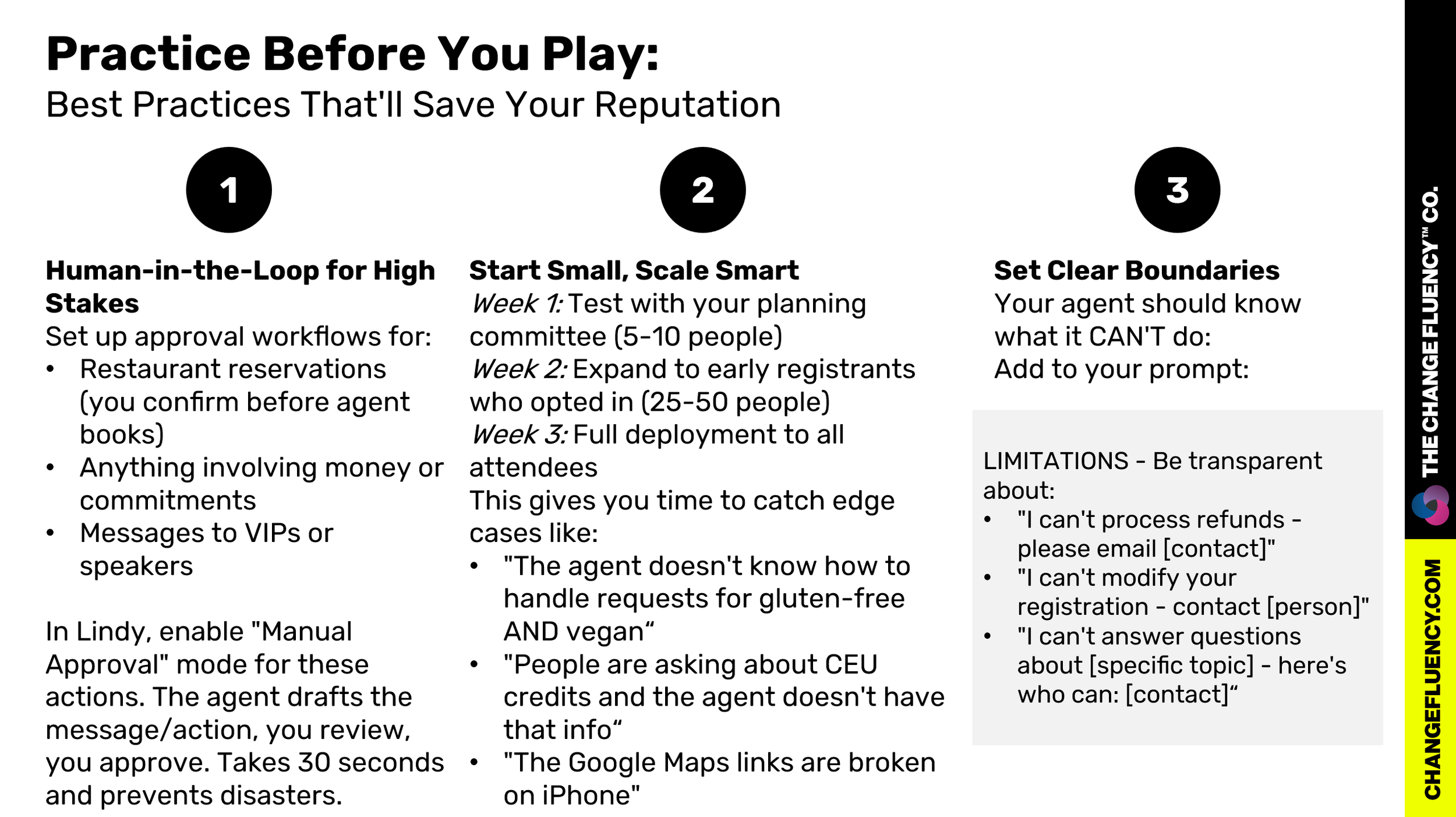
Before you blast 500 people, test thoroughly:
Add yourself as a test attendee in Google Sheet
Trigger the 7-day message manually (use "Test Trigger" in Lindy)
Reply with questions:
"I need a dinner reservation"
"How do I get to the venue?"
"What sessions should I attend?"
Check the responses - Are they accurate? Helpful? On-brand?
Refine your prompt or knowledge base based on what feels off:
Agent giving wrong information: edit the knowledge base information
Agent pulling info from wrong place: edit the prompts to be more specific of what the agent can and can’t do
Pro tip: Create 2-3 fake attendee profiles with different interests and dietary restrictions to see how well personalization works.
Beyond the Concierge: What Else Can You Build?
Once you've tasted the power of no-code AI agents, you won't stop at one. Here are other agents event planners are building:
1. Speaker Coordinator Agent
Sends automated reminders about AV requirements, deadlines, travel details
Collects bios and headshots
Manages slide deck submissions
Coordinates green room logistics
Build time: 30 minutes | ROI: Eliminates 10+ hours of back-and-forth emails
2. Sponsor Fulfillment Agent
Tracks deliverables per sponsor package
Sends proof of performance (booth traffic, logo placements, mentions)
Automates invoice reminders
Collects feedback for renewal conversations
Build time: 45 minutes | ROI: Faster sponsor renewals, professional follow-through
3. Post-Event Follow-Up Agent
Sends personalized thank-you messages with session recordings
Collects feedback via conversational survey (higher completion rates)
Offers early-bird pricing for next year
Shares relevant resources based on sessions attended
Build time: 20 minutes | ROI: 40% higher survey completion, stronger attendee relationships
4. Vendor Management Agent
Coordinates load-in/load-out times
Manages certificates of insurance collection
Sends setup reminders and floor plan references
Handles last-minute change requests
Build time: 35 minutes | ROI: Fewer day-of surprises, happier vendors
5. Volunteer Coordinator Agent
Sends shift reminders and location details
Answers common volunteer questions
Collects hours worked for reporting
Sends appreciation messages and certificates
Build time: 25 minutes | ROI: Better volunteer experience, less coordinator burnout
6. Accessibility Support Agent
Pre-event outreach about accommodation needs
Coordinates ASL interpreters, live captioning
Provides accessible route information
Manages dietary accommodation logistics
Build time: 40 minutes | ROI: More inclusive events, happier attendees
The Pattern You'll Notice
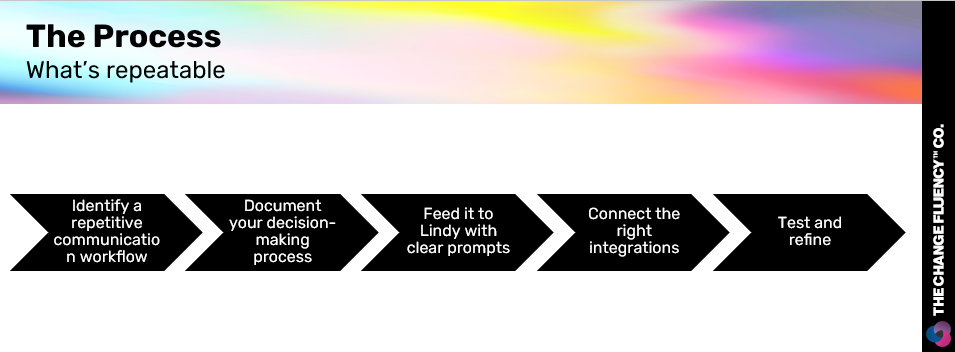
Each agent follows the same build process:
The average event planner spends 60-70% of their time on logistics communication. What if you could automate 40% of that and focus on the creative, strategic, relationship-building work that actually moves the needle?
That's not a hypothetical. That's what these agents do.
Next Steps
Build Your Agent
You have everything you need in this post:
The exact prompt
Integration instructions
Best practices
Cost breakdowns
Time investment: 60 minutes
Risk: Low (start with test group)
Reward: Massive time savings, better attendee experience, conference hero status
Go to lindy.ai, create an account, and start building. You'll be shocked how fast this comes together.
Good luck!